概要
PDF上のテキストにハイライト表示を追加、削除、変更、一覧の取得ができます。
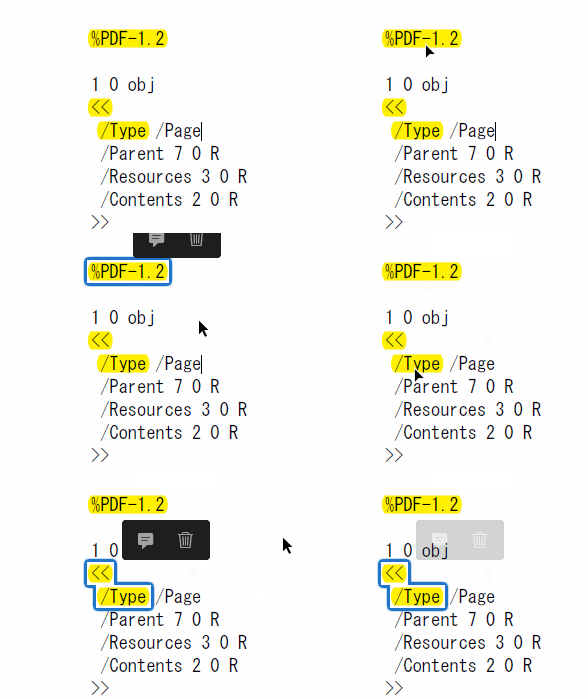
行がまたがったテキスト(<</Type)も上記のように1つのハイライト表示にできます。VBAからAcrobat OLE経由でAcrobat JavaScriptを実行して処理をします。
座標の取得
ハイライト表示にするテキストの位置は、当サイト公開の関数: GetTextsGetRects「関数:文字列のページ番号と座標を返す」 を使用して取得します。関数で文字列検索をさせ、そのページ番号と座標を取得します。
1. サンプル:ハイライト表示の追加
PDFの指定ページ上の指定テキストをハイライト表示にします。以下は実行するAcrobat JavaScriptです。@ 部分はVBAから変更します。
var annot = this.addAnnot({
    type:'Highlight',
    quads:[@q],
    page:@p,
    strokeColor:@c ,
});
- @q:座標(Left , Top , Right , Top , Left , Bottom , Right , Bottom)
「関数:文字列のページ番号と座標を返す」からの座標を使用 - @p:ページ番号、0から開始
- @c:色
- 白: color.white
- 赤: color.red
- 緑: color.green
- 青: color.blue
- シアン: color.cyan
- マゼンタ: color.magenta
- イエロー: color.yellow
- ダークグレー: color.dkGray
- グレー: color.gray
- ライトグレー: color.ltGray
参照設定が2つ必要です。
Download: /sample-Annot-Highlight.zip ( 151.9 KB )
001 Option Explicit
002
003 'Debug Mode True:オン False:オフ
004 Private Const DEBUG_MODE As Boolean = False
005
006 '**************************************************
007 '
008 '   PDF上のテキストをハイライト表示にする
009 '
010 '   Create  : 2020/06/20
011 '   Update  :
012 '   Vertion : 1.0.2
013 '
014 '   https://pdf-file.nnn2.com/?p=1105
015 '
016 '**************************************************
017
018 Sub sample_Highlight_Add()
019     Dim start As Double: start = Timer
020
021     Dim i1                  As Long
022     Dim bRet                As Boolean
023     Dim sFilePathIn         As String
024     Dim iOutCnt             As Long
025     Dim gSerch(19)          As type_SerchTexts
026     Dim gRects()            As type_TextRect
027
028     Const CON_TEST = 2
029
030     '********************************************
031     '▼ テキストの座標を得る         ▼
032     '********************************************
033
034     i1 = 0
035     If CON_TEST = 1 Then
036         gSerch(i1).sSerchText = "ATA": i1 = i1 + 1
037         gSerch(i1).sSerchText = "ス63": i1 = i1 + 1
038         gSerch(i1).sSerchText = "Windows": i1 = i1 + 1
039         gSerch(i1).sSerchText = "Home 64": i1 = i1 + 1
040         gSerch(i1).sSerchText = "10": i1 = i1 + 1
041         gSerch(i1).sSerchText = "8GB": i1 = i1 + 1
042         gSerch(i1).sSerchText = "USB": i1 = i1 + 1
043         gSerch(i1).sSerchText = "HDD": i1 = i1 + 1
044         gSerch(i1).sSerchText = "i5-9400": i1 = i1 + 1
045         gSerch(i1).sSerchText = "RAM": i1 = i1 + 1
046         gSerch(i1).sSerchText = "音電": i1 = i1 + 1
047         gSerch(i1).sSerchText = "6ス": i1 = i1 + 1
048         gSerch(i1).sSerchText = "ル)": i1 = i1 + 1
049         gSerch(i1).sSerchText = "Adobe": i1 = i1 + 1
050         gSerch(i1).sSerchText = "Acrobat": i1 = i1 + 1
051         gSerch(i1).sSerchText = "JavaScript": i1 = i1 + 1
052         gSerch(i1).sSerchText = "Get": i1 = i1 + 1
053         gSerch(i1).sSerchText = "getPage": i1 = i1 + 1
054         gSerch(i1).sSerchText = "Common Dialog Control": i1 = i1 + 1
055         gSerch(i1).sSerchText = "Text""annot": i1 = i1 + 1
056         sFilePathIn = ThisWorkbook.Path & "\test-002.pdf"
057     Else
058         gSerch(i1).sSerchText = "文目": i1 = i1 + 1
059         gSerch(i1).sSerchText = "ビューア": i1 = i1 + 1
060         gSerch(i1).sSerchText = "文字や図形や画像": i1 = i1 + 1
061         gSerch(i1).sSerchText = "Acrobat Reader": i1 = i1 + 1
062         gSerch(i1).sSerchText = "テキスト": i1 = i1 + 1
063         gSerch(i1).sSerchText = "構成する様々な要素": i1 = i1 + 1
064         gSerch(i1).sSerchText = "%PDF-1.2": i1 = i1 + 1
065         gSerch(i1).sSerchText = "Acrobat": i1 = i1 + 1
066         gSerch(i1).sSerchText = "がPDF": i1 = i1 + 1
067         gSerch(i1).sSerchText = "<</Type": i1 = i1 + 1
068         'gSerch(i1).sSerchText = "<< /Type": i1 = i1 + 1
069         sFilePathIn = ThisWorkbook.Path & "\手書きPDF入門-4.pdf"
070     End If
071
072     'PDF上をテキスト検索し、そのページ番号と座標を取得
073     'URL: https://pdf-file.nnn2.com/?p=1099
074     bRet = GetTextsGetRects(sFilePathIn, -1, -1, _
075                 gSerch, gRects, iOutCnt)
076
077     '********************************************
078     '▼ ハイライト表示にする         ▼
079     '********************************************
080
081     Dim sWkCon              As String
082     Dim sQuads              As String
083     Dim i2                  As Long
084     Dim sAJS                As String
085     Dim sReturn             As String
086     Dim objAcroApp          As New Acrobat.AcroApp
087     Dim objAcroAVDoc        As New Acrobat.AcroAVDoc
088     Dim objAcroPDDoc        As New Acrobat.AcroPDDoc
089     Dim objAcroPDPage       As Acrobat.AcroPDPage
090     Dim objAcroAVPageView   As Acrobat.AcroAVPageView
091     Dim objAFormApp         As AFORMAUTLib.AFormApp
092     Dim objAFormFields      As AFORMAUTLib.Fields
093
094     objAcroApp.CloseAllDocs
095     objAcroApp.Hide '稀にデスクトップに表示されるので隠す
096     'PDFファイルを開く
097     bRet = objAcroAVDoc.Open(sFilePathIn, "")
098     Set objAcroPDDoc = objAcroAVDoc.GetPDDoc
099     Set objAFormApp = CreateObject("AFormAut.App")
100     Set objAFormFields = objAFormApp.Fields
101
102     Const sAcrobatJavaScript3 = _
103         "oRet = this.addAnnot({" & _
104         "   type:'Highlight' ," & _
105         "   quads:[@q] ," & _
106         "   page:@p ," & _
107         "   strokeColor:@c ," & _
108         "}); "
109 '        "   contents:'@t', " & _
110 '        "   author:'@A' ," & _
111
112     If DEBUG_MODE Then
113         Call Put_Degug_log("")
114         For i1 = 0 To iOutCnt
115             With gRects(i1)
116                 If .iSearchNo = -1 Then Exit For
117                 Call Put_Degug_log( _
118                     "Text(" & i1 & ")=[" & _
119                     gSerch(.iSearchNo).sSerchText & _
120                     "] SIndex=" & .iSearchNo & _
121                     " Page=" & .iPageNo & _
122                     " Quads=" & .sQuads)
123             End With
124         Next i1
125     End If
126
127     For i1 = 0 To iOutCnt
128         With gRects(i1)
129             sWkCon = "Text=[" & _
130                 Replace(gSerch(.iSearchNo).sSerchText, "'", "''") & _
131                 "] " & _
132                 " Quads=" & .sQuads
133             sAJS = sAcrobatJavaScript3
134             sAJS = Replace(sAJS, "@q", EditQuads_8item(.sQuads))
135             sAJS = Replace(sAJS, "@c", "color.yellow")
136             sAJS = Replace(sAJS, "@p", .iPageNo)
137 '            sAJS = Replace(sAJS, "@t", sWkCon)
138         End With
139         '■Acrobat JavaScript の実行
140         sReturn = objAFormFields.ExecuteThisJavascript(sAJS)
141     Next i1
142
143     'PDFファイルを別名で保存
144     Dim sFilePathOut        As String
145     sFilePathOut = Replace(sFilePathIn, ".pdf", "-Add_Highlight.pdf")
146     If objAcroPDDoc.Save(1, sFilePathOut) = False Then
147         MsgBox "PDFファイルへ保存出来ませんでした", _
148             vbOKOnly + vbCritical, "実行エラー"
149     End If
150     '変更しないで閉じます。
151     bRet = objAcroAVDoc.Close(False)
152     'Acrobatアプリケーションの終了
153     objAcroApp.Hide
154     objAcroApp.Exit
155     'オブジェクトの開放
156     Set objAcroAVPageView = Nothing
157     Set objAcroPDPage = Nothing
158     Set objAcroAVDoc = Nothing
159     Set objAFormApp = Nothing
160     Set objAFormFields = Nothing
161     Set objAcroApp = Nothing
162
163     Debug.Print "Output Count = " & iOutCnt
164     Debug.Print "Total Time   = " & Timer - start
165
166     If DEBUG_MODE Then Call Run_NOTEPAD
167 End Sub
168
169 '**************************************************
170 '
171 '   Quads値を8値で1組に変換する
172 '
173 '   Create : 2020/06/08
174 '   Version: 1.0.0
175 '
176 '    1,2,3,4,5,6,7,8,9,10,11,12,13,14,15 ->
177 '   [1,2,3,4,5,6,7,8],[9,10,11,12,13,14,15]
178 '
179 '**************************************************
180 Private Function EditQuads_8item(ByVal sQuads As String)
181     Dim sWk()   As String
182     Dim sQ      As String
183     Dim i1      As Long
184     EditQuads_8item = ""
185     sWk = Split(sQuads, ",")
186     For i1 = 0 To UBound(sWk) Step 8
187         sQ = "[" & sWk(i1 + 0) & ","
188         sQ = sQ + sWk(i1 + 1) & ","
189         sQ = sQ + sWk(i1 + 2) & ","
190         sQ = sQ + sWk(i1 + 3) & ","
191         sQ = sQ + sWk(i1 + 4) & ","
192         sQ = sQ + sWk(i1 + 5) & ","
193         sQ = sQ + sWk(i1 + 6) & ","
194         sQ = sQ + sWk(i1 + 7) & "]"
195         If EditQuads_8item <> "" Then _
196            EditQuads_8item = EditQuads_8item & ","
197         EditQuads_8item = EditQuads_8item & sQ
198     Next i1
199 End Function
1.1 実行結果
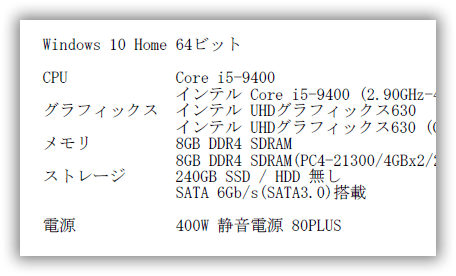
実行前です。
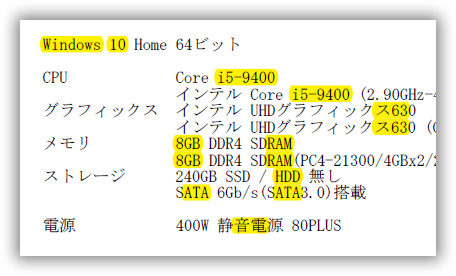
実行後です。
2. サンプル:ハイライト表示の削除
ハイライト表示になっているのを解除します。テキストの削除はしません。以下は実行するAcrobat JavaScriptです。@ 部分はVBAから変更します。
var annots = this.getAnnots({ nPage:@p });
for (var i = 0; i < annots.length; i++)
if (annots[i].type == "Highlight")
  annots[i].destroy();
- @p:ページ番号、0から開始
参照設定が2つ必要です。
Download: /sample-Annot-Highlight.zip ( 151.9 KB )
001 Option Explicit
002
003 '
004 '   PDFのハイライト表示の注釈を削除
005 '
006 '   2020/04/11
007 '
008
009 Private Sub sample_Highlight_Delete()
010
011     Dim start As Double: start = Timer
012
013     Dim objAcroApp          As New Acrobat.AcroApp
014     Dim objAcroAVDoc        As New Acrobat.AcroAVDoc
015     Dim objAcroPDDoc        As New Acrobat.AcroPDDoc
016     Dim objAcroPDPage       As Acrobat.AcroPDPage
017     Dim objAcroAVPageView   As Acrobat.AcroAVPageView
018     Dim objAFormApp         As AFORMAUTLib.AFormApp
019     Dim objAFormFields      As AFORMAUTLib.Fields
020     Dim objAFormField       As AFORMAUTLib.Field
021
022     Dim iPageNo             As Long
023     Dim iPageCnt            As Long
024     Dim iRet                As Long
025     Dim bRet                As Boolean
026     Dim sFilePathIn         As String
027     Dim sAJS                As String
028     Dim sJsRet              As String
029
030     'ページ単位でのハイライト表示の注釈を削除
031     Const sAcrobatJavaScript1 = _
032         "var annots = this.getAnnots({ nPage:@p });" & _
033         "for (var i = 0; i < annots.length; i++) " & _
034         "if (annots[i].type == 'Highlight') " & _
035         "  annots[i].destroy();" & _
036         "event.value=i;"
037
038     '全ページのハイライト表示の注釈を削除
039     Const sAcrobatJavaScript2 = _
040         "var annots = this.getAnnots({  });" & _
041         "for (var i = 0; i < annots.length; i++)" & _
042         "if (annots[i].type == 'Highlight') " & _
043         "  annots[i].destroy();" & _
044         "event.value=i;"
045
046     sFilePathIn = ThisWorkbook.Path & "\test-004-New.pdf"
047 '    sFilePathIn = ThisWorkbook.Path & "\手書きPDF入門-4.pdf"
048
049     objAcroApp.CloseAllDocs
050     objAcroApp.Hide '稀にデスクトップに表示されるので隠す
051     'PDFファイルを開く
052     bRet = objAcroAVDoc.Open(sFilePathIn, "")
053     Set objAcroPDDoc = objAcroAVDoc.GetPDDoc
054     iPageCnt = objAcroPDDoc.GetNumPages
055
056     Set objAFormApp = CreateObject("AFormAut.App")
057     Set objAFormFields = objAFormApp.Fields
058     Set objAcroPDDoc = objAcroAVDoc.GetPDDoc
059
060     Const CON_TEST = 2
061
062     If CON_TEST = 1 Then
063         'ページ単位での削除
064
065         For iPageNo = 0 To iPageCnt - 1
066             'Acrobat JavaScriptの編集
067             sAJS = sAcrobatJavaScript1
068             sAJS = Replace(sAJS, "@p", iPageNo)
069             'Acrobat JavaScript の実行
070             sJsRet = objAFormFields.ExecuteThisJavascript(sAJS)
071
072             Debug.Print "Page=" & iPageNo + 1 & _
073                 " Delete=" & sJsRet
074         Next iPageNo
075     Else
076         '全ページでの削除
077
078         'Acrobat JavaScriptの編集
079         sAJS = sAcrobatJavaScript2
080         'Acrobat JavaScript の実行
081         sJsRet = objAFormFields.ExecuteThisJavascript(sAJS)
082
083         Debug.Print "Page=All Delete=" & sJsRet
084     End If
085
086     'PDFファイルを別名で保存
087     Dim sFilePathOut        As String
088     sFilePathOut = Replace(sFilePathIn, _
089         ".pdf", "-Dele_Highlight.pdf")
090     If objAcroPDDoc.Save(1, sFilePathOut) = False Then
091         MsgBox "PDFファイルへ保存出来ませんでした", _
092             vbOKOnly + vbCritical, "実行エラー"
093     End If
094     '変更しないで閉じます。
095     bRet = objAcroAVDoc.Close(False)
096     'Acrobatアプリケーションの終了
097     objAcroApp.Hide
098     objAcroApp.Exit
099     'オブジェクトの開放
100     Set objAcroAVPageView = Nothing
101     Set objAFormFields = Nothing
102     Set objAFormField = Nothing
103     Set objAcroPDPage = Nothing
104     Set objAcroPDDoc = Nothing
105     Set objAcroAVDoc = Nothing
106     Set objAcroApp = Nothing
107
108     Debug.Print "Total Time   = " & Timer - start
109 End Sub
2.1 実行結果
実行前です。
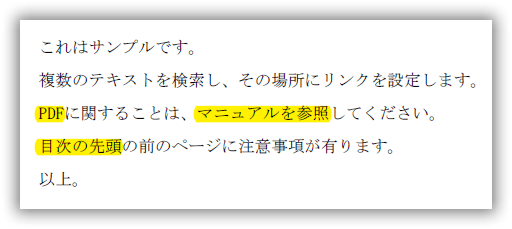
実行後です。

3. サンプル:ハイライト表示の色を変更
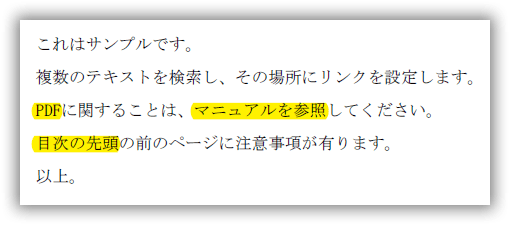
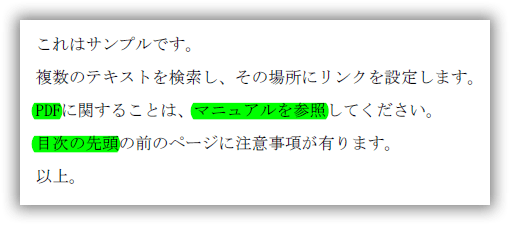
ハイライト表示の色を変更します。黄色(color.yellow)から緑(color.green)に変更します。
以下は実行するAcrobat JavaScriptです。@ 部分はVBAから変更します。
var annots = this.getAnnots({ nPage:@p });
for (var i = 0; i < annots.length; i++)
if (annots[i].type == "Highlight")
  annots[i].strokeColor = @c;
- @p:ページ番号、0から開始
- @c:ハイライトの色
- 白: color.white
- 赤: color.red
- 緑: color.green
- 青: color.blue
- シアン: color.cyan
- マゼンタ: color.magenta
- イエロー: color.yellow
- ダークグレー: color.dkGray
- グレー: color.gray
- ライトグレー: color.ltGray
参照設定が2つ必要です。
Download: /sample-Annot-Highlight.zip ( 151.9 KB )
001 Option Explicit
002
003 '
004 '   PDFのハイライト表示の注釈の色を変更
005 '
006 '   2020/04/11
007 '
008 '   Acrobat JavaScriptのカラー定数
009 '       白: color.white
010 '       赤: color.red
011 '       緑: color.green
012 '       青: color.blue
013 '       シアン: color.cyan
014 '       マゼンタ: color.magenta
015 '       イエロー: color.yellow
016 '       ダークグレー: color.dkGray
017 '       グレー:    color.Gray
018 '       ライトグレー: color.ltGray
019 '
020
021 Private Sub sample_Highlight_Update()
022
023     Dim start As Double: start = Timer
024
025     Dim objAcroApp          As New Acrobat.AcroApp
026     Dim objAcroAVDoc        As New Acrobat.AcroAVDoc
027     Dim objAcroPDDoc        As New Acrobat.AcroPDDoc
028     Dim objAcroPDPage       As Acrobat.AcroPDPage
029     Dim objAcroAVPageView   As Acrobat.AcroAVPageView
030     Dim objAFormApp         As AFORMAUTLib.AFormApp
031     Dim objAFormFields      As AFORMAUTLib.Fields
032     Dim objAFormField       As AFORMAUTLib.Field
033
034     Dim iPageNo             As Long
035     Dim iPageCnt            As Long
036     Dim iRet                As Long
037     Dim bRet                As Boolean
038     Dim sFilePathIn         As String
039     Dim sAJS                As String
040     Dim sJsRet              As String
041
042     'ページ単位でのハイライト表示の注釈の色を変更
043     Const sAcrobatJavaScript1 = _
044         "var annots = this.getAnnots({ nPage:@p });" & _
045         "for (var i = 0; i < annots.length; i++)" & _
046         "if (annots[i].type == 'Highlight') " & _
047         "  annots[i].strokeColor = @c;" & _
048         "event.value=i;"
049
050     '全ページのハイライト表示の注釈の色を変更
051     Const sAcrobatJavaScript2 = _
052         "var annots = this.getAnnots({ });" & _
053         "for (var i = 0; i < annots.length; i++)" & _
054         "if (annots[i].type == 'Highlight') " & _
055         "  annots[i].strokeColor = @c;" & _
056         "event.value=i;"
057
058     sFilePathIn = ThisWorkbook.Path & "\test-004-New.pdf"
059 '    sFilePathIn = ThisWorkbook.Path & "\手書きPDF入門-4.pdf"
060
061     objAcroApp.CloseAllDocs
062     objAcroApp.Hide '稀にデスクトップに表示されるので隠す
063
064     'PDFファイルを開く
065     bRet = objAcroAVDoc.Open(sFilePathIn, "")
066     Set objAcroPDDoc = objAcroAVDoc.GetPDDoc
067     iPageCnt = objAcroPDDoc.GetNumPages
068
069     Set objAFormApp = CreateObject("AFormAut.App")
070     Set objAFormFields = objAFormApp.Fields
071     Set objAcroPDDoc = objAcroAVDoc.GetPDDoc
072
073     Const CON_TEST = 1
074
075     If CON_TEST = 1 Then
076         'ページ単位での変更
077
078         For iPageNo = 0 To iPageCnt - 1
079             'Acrobat JavaScriptの編集
080             sAJS = sAcrobatJavaScript1
081             sAJS = Replace(sAJS, "@p", iPageNo)
082             sAJS = Replace(sAJS, "@c", "color.green")
083             'Acrobat JavaScript の実行
084             sJsRet = objAFormFields.ExecuteThisJavascript(sAJS)
085
086             Debug.Print "Page=" & iPageNo + 1 & _
087                 " Update=" & sJsRet
088         Next iPageNo
089     Else
090         '全ページでの変更
091
092         'Acrobat JavaScriptの編集
093         sAJS = sAcrobatJavaScript2
094         sAJS = Replace(sAJS, "@c", "color.green")
095         'Acrobat JavaScript の実行
096         sJsRet = objAFormFields.ExecuteThisJavascript(sAJS)
097
098         Debug.Print "Page=All Update=" & sJsRet
099     End If
100
101     'PDFファイルを別名で保存
102     Dim sFilePathOut        As String
103     sFilePathOut = Replace(sFilePathIn, ".pdf", _
104         "-Update_Highlight.pdf")
105     If objAcroPDDoc.Save(1, sFilePathOut) = False Then
106         MsgBox "PDFファイルへ保存出来ませんでした", _
107             vbOKOnly + vbCritical, "実行エラー"
108     End If
109     '変更しないで閉じます。
110     bRet = objAcroAVDoc.Close(False)
111     'Acrobatアプリケーションの終了
112     objAcroApp.Hide
113     objAcroApp.Exit
114     'オブジェクトの開放
115     Set objAcroAVPageView = Nothing
116     Set objAFormFields = Nothing
117     Set objAFormField = Nothing
118     Set objAcroPDPage = Nothing
119     Set objAcroPDDoc = Nothing
120     Set objAcroAVDoc = Nothing
121     Set objAcroApp = Nothing
122
123     Debug.Print "Total Time = " & Timer - start
124 End Sub
3.1 実行結果
実行前です。
実行後です。
4. サンプル:ハイライト表示の一覧
ハイライト表示になっている箇所の
- ページ番号
- 座標:Left , Right , Top , Bottom
を取得します。
参照設定が2つ必要です。
Download: /sample-Annot-Highlight.zip ( 151.9 KB )
001 Option Explicit
002
003 '
004 '   PDFのハイライト表示の一覧を取得
005 '
006 '   2020/04/11
007 '
008
009 Private Sub sample_Highlight_List()
010
011     Dim start As Double: start = Timer
012
013     Dim objAcroApp          As New Acrobat.AcroApp
014     Dim objAcroAVDoc        As New Acrobat.AcroAVDoc
015     Dim objAcroPDDoc        As New Acrobat.AcroPDDoc
016     Dim objAcroPDPage       As Acrobat.AcroPDPage
017     Dim objAcroAVPageView   As Acrobat.AcroAVPageView
018     Dim objAFormApp         As AFORMAUTLib.AFormApp
019     Dim objAFormFields      As AFORMAUTLib.Fields
020     Dim objAFormField       As AFORMAUTLib.Field
021
022     Dim iPageNo             As Long
023     Dim iPageCnt            As Long
024     Dim iRet                As Long
025     Dim bRet                As Boolean
026     Dim sFilePathIn         As String
027     Dim sAJS                As String
028     Dim sJsRet              As String
029
030     'ページ単位でのハイライト表示の一覧
031     Const sAcrobatJavaScript1 = _
032         "var sout='';" & _
033         "var annots = this.getAnnots({ nPage:@p });" & _
034         "for (var i = 0; i < annots.length; i++)" & _
035         "if (annots[i].type == 'Highlight') " & _
036         "sout=sout + annots[i].page +  '\t' + i + '\t' + " & _
037         "annots[i].strokeColor + '\t' + annots[i].quads + '\b';" & _
038         "event.value=sout;"
039     '※特殊文字「\b:バックスペース」「\t:タブ」データの区切り
040
041     '全ページのハイライト表示の一覧
042     Const sAcrobatJavaScript2 = _
043         "var sout='';" & _
044         "var annots = this.getAnnots({ });" & _
045         "for (var i = 0; i < annots.length; i++)" & _
046         "if (annots[i].type == 'Highlight') " & _
047         "sout=sout + annots[i].page +  '\t' + i + '\t' + " & _
048         "annots[i].strokeColor + '\t' + annots[i].quads + '\b';" & _
049         "event.value=sout;"
050
051     sFilePathIn = ThisWorkbook.Path & "\test-004-New.pdf"
052 '    sFilePathIn = ThisWorkbook.Path & "\手書きPDF入門-4-Add_Highlight.pdf"
053
054     objAcroApp.CloseAllDocs
055     objAcroApp.Hide '稀にデスクトップに表示されるので隠す
056
057     'PDFファイルを開く
058     bRet = objAcroAVDoc.Open(sFilePathIn, "")
059     Set objAcroPDDoc = objAcroAVDoc.GetPDDoc
060     iPageCnt = objAcroPDDoc.GetNumPages
061
062     Set objAFormApp = CreateObject("AFormAut.App")
063     Set objAFormFields = objAFormApp.Fields
064     Set objAcroPDDoc = objAcroAVDoc.GetPDDoc
065
066     Dim i1          As Long
067     Dim i2          As Long
068     Dim sAjWk1()    As String
069     Dim sAjWk2()    As String
070     Dim sAjWk3()    As String
071     Dim sAjWk4      As String
072
073     Const CON_TEST = 1  'テストケース
074
075     If CON_TEST = 1 Then
076         'ページ単位での一覧
077
078         For iPageNo = 0 To iPageCnt - 1
079             'Acrobat JavaScriptの編集
080             sAJS = sAcrobatJavaScript1
081             sAJS = Replace(sAJS, "@p", iPageNo)
082             'Acrobat JavaScript の実行
083             sJsRet = objAFormFields.ExecuteThisJavascript(sAJS)
084
085             '結果を編集
086             sAjWk1 = Split(sJsRet, vbBack)
087             For i1 = 0 To UBound(sAjWk1)
088                 If sAjWk1(i1) = "" Then Exit For
089                 sAjWk2 = Split(sAjWk1(i1), vbTab)
090                 sAjWk3 = Split(sAjWk2(3), ",")
091                 sAjWk4 = ""
092                 For i2 = 0 To UBound(sAjWk3)
093                     If sAjWk4 <> "" Then sAjWk4 = sAjWk4 & ","
094                     sAjWk4 = sAjWk4 & sAjWk3(i2)
095                 Next i2
096                 '結果を出力
097                 Debug.Print "Page=" & sAjWk2(0) & _
098                     " seq=" & sAjWk2(1) & _
099                     " color=" & sAjWk2(2) & _
100                     " quads=" & sAjWk4
101             Next i1
102         Next iPageNo
103     Else
104         '全ページでの一覧
105
106         'Acrobat JavaScriptの編集
107         sAJS = sAcrobatJavaScript2
108         'Acrobat JavaScript の実行
109         sJsRet = objAFormFields.ExecuteThisJavascript(sAJS)
110
111         '結果を編集
112         sAjWk1 = Split(sJsRet, vbBack)
113         For i1 = 0 To UBound(sAjWk1)
114             If sAjWk1(i1) = "" Then Exit For
115             sAjWk2 = Split(sAjWk1(i1), vbTab)
116             sAjWk3 = Split(sAjWk2(3), ",")
117             sAjWk4 = ""
118             For i2 = 0 To UBound(sAjWk3)
119                 If sAjWk4 <> "" Then sAjWk4 = sAjWk4 & ","
120                 sAjWk4 = sAjWk4 & sAjWk3(i2)
121             Next i2
122             '結果を出力
123             Debug.Print "Page=" & sAjWk2(0) & _
124                 " seq=" & sAjWk2(1) & _
125                 " color=" & sAjWk2(2) & _
126                 " quads=" & sAjWk4
127         Next i1
128     End If
129
130     '変更しないで閉じます。
131     bRet = objAcroAVDoc.Close(False)
132     'Acrobatアプリケーションの終了
133     objAcroApp.Hide
134     objAcroApp.Exit
135     'オブジェクトの開放
136     Set objAcroAVPageView = Nothing
137     Set objAFormFields = Nothing
138     Set objAFormField = Nothing
139     Set objAcroPDPage = Nothing
140     Set objAcroPDDoc = Nothing
141     Set objAcroAVDoc = Nothing
142     Set objAcroApp = Nothing
143
144     Debug.Print "Total Time   = " & Timer - start
145 End Sub
4.1 実行結果
結果はDebug.printでイミディエイト画面上に表示されます。
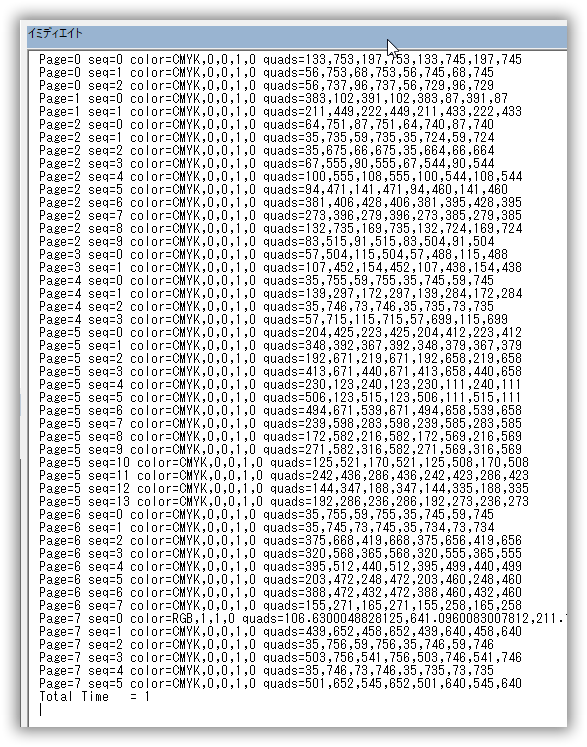
複数の行(列)にまたがったハイライトの座標 quads は 8 x n個の表示になります。
Page=0 seq=3 color=CMYK,0,0,1,0 quads=515.9249877929688,254.5070037841797,554.4559936523438,254.5070037841797,515.9249877929688,244.94500732421875,554.4559936523438,244.94500732421875,74.52000427246094,240.10699462890625,113.00399780273438,240.10699462890625,74.52000427246094,230.5449981689453,113.00399780273438,230.5449981689453
上記はカンマの区切りでquadsに16個の数値が存在します。
quadsプロパティのパラメータ
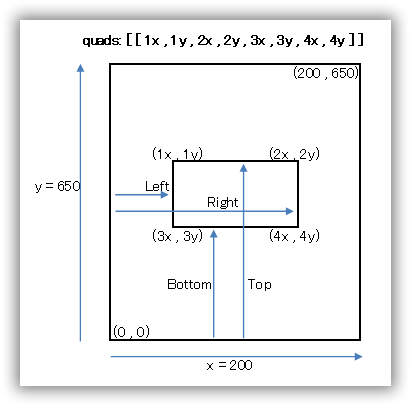
ハイライト表示で重要なquadsプロパティのパラメータ。各値が座標上のどの位置を示すか図で出してみました。
▼座標が1つの場合
quads: [[
    Left ,Top,
    Right,Top,
    Left ,Bottom,
    Right,Bottom
    ]],
▼座標が2つにまたがる場合
quads: [[
    Left ,Top,
    Right,Top,
    Left ,Bottom,
    Right,Bottom
    ] , [
    Left ,Top,
    Right,Top,
    Left ,Bottom,
    Right,Bottom
    ]],
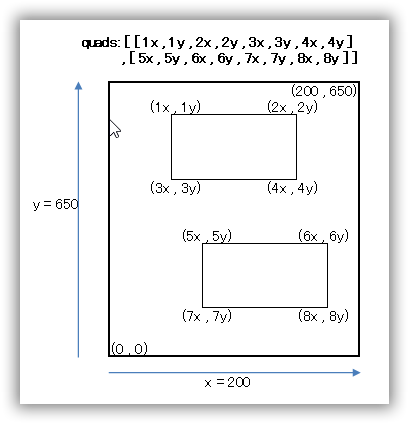
3つ以上になると quads [ [ ] , [ ] , [ ] , ・・・] となります。1つの [ ] で1つの四角を示します。
Acrobat JavaScript
各命令(メソッド、プロパティ)の説明は省略します。サンプルをそのままご使用ください。
詳細を知りたい方は、公開マニュアル「JavaScript™ for Acrobat® API Reference Adobe® Acrobat® SDK バージョン 8.0」を御覧ください。
注意
- Acrobat JavaScript でハイライト表示の座標の指定には「quads」を使用してください。「rect」を使った説明が公式解説書にもネット情報にも存在しますが、実際は正常に機能しません。
- Acrobat JavaScriptの日本語版の解説書は上記以降は英語版しか存在しません。機能的なUpdateも殆ど無いので最新バージョンのAcrobatに相当するマニュアルも存在しません。それが現実です。
テキストの抽出は無理
一覧にハイライト表示の対象になっているテキストも抽出できたらイイのですが、これは少し無理が有ります。文字の幅が同じの等幅フォントなら計算でピッタシと出すことは出来ます。
しかし今はプロポーショナルフォント (又は可変幅フォント)を使うのが一般的で、そうなると文字幅が変化します。それを正確に計算で出すのは技術的に(今の私には)無理です。
※それでも要望が有れば、作ります!
テキスト上でなくても構わない
ハイライトは基本的にテキスト(文字列)の上に追加します。Acrobat又はAcrobat Readerでテキストを選択した状態でしか、ハイライト操作はできません。しかし、実際はどこでも出来ます。
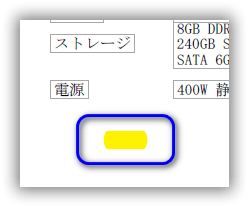
上記はAcrobat JavaScriptで追加したハイライトです。
備考
- 特になし。
参照
- Acrobat JavaScript:
Adobe® Acrobat® SDK バージョン 8.0 日本語の解説書- addAnnot
Annotation オブジェクト(注釈)を作成。 - Type
注釈のタイプ(種類) - quads
n 個の四角形の座標。8 × n の数値配列。 - getPageNthWordQuads
ページ上の n 番目の単語の quads のリストを取得 - strokeColor
描くときの色を指定
- addAnnot
管理者の技術メモ
これ以降はサイト管理者が当ページを管理する為のメモです。見なくても結構です。
rectプロパティを使用すると
座標の取得はquadsプロパティを使います。rectプロパティを使うと元より2ポイントほど大きめの座標が取得されてしまいます。以下は「ATA」テキスト上のハイライト表示の座標を使用した結果です。
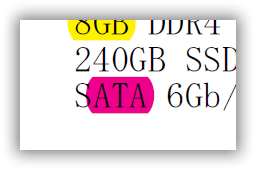
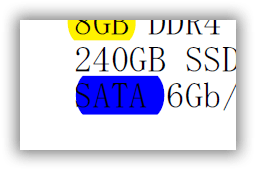
下のrect プロパティで取得した座標で再度ハイライト表示を行うと前の「S」文字まで入ってしまいます。
またrectプロパティでは複数(行、列)の座標は取得できません。
サンプル:ハイライト表示の追加
quadsで四角形の座標を2つ同時に指定している部分に注目。
2つ指定の情報はネットに無く、テスト結果から出しました。
var annot = this.addAnnot({
    type: "Highlight",
    quads: [[107.16175842285156 , 604.546630859375 , 126.39341735839844 , 604.546630859375 , 107.16175842285156 , 594.9851684570312 , 126.39341735839844 , 594.9851684570312 ] , [74.52000427246094 , 590.1466674804688 , 97.49845886230469 , 590.1466674804688 , 74.52000427246094 , 580.585205078125 , 97.49845886230469 , 580.585205078125]] ,
    page: 0,
    strokeColor: color.yellow,
});
サンプル:ページ 0 の「Highlight」注釈の座標を表示
var annots = this.getAnnots({ nPage:0 });
for (var i = 0; i < annots.length; i++)
    if (annots[i].type == "Highlight")
         console.println( annots[i].quads + '\n');
複数行にまたがるハイライト表示は「8 x 複数行」の数値がカンマ「,」区切りで標示される。「[」は表示されません。
以上。